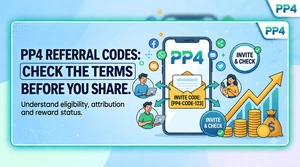
Understand code attribution, eligibility and the difference between a pending reward and an available balance.
PP4 for Indian Readers: Mobile Setup, Accounts & Game Guides

Getting started with PP4 should begin with clear information. This guide brings mobile access, account steps and game explanations together for readers in India. Use it to understand what to check on your device before following an app link or choosing an available game mode.
Whether you use an Android handset on mobile data or an iPhone on Wi-Fi, the useful questions are similar: does the service support your device, what information does it request, and which terms apply? The sections below explain those checks without promising particular rewards, results or processing times.
A Quick Reference Before You Begin


| What to check | Where to look |
| Service | PP4 mobile information |
| Device access | Check the current Android package or browser options |
| Game information | Read the rules for each available card or multiplier game |
| Payment conditions | Review eligibility, limits and the transaction status shown |
| Getting assistance | Use the help channel displayed within your account |
How This PP4 Guide Helps
A small-screen interface can put a lot of information in one place: game tiles, profile settings, promotions and balance entries. Take a moment to understand each section instead of following whichever banner appears first. Availability and features can change with your location, device and the version you open.
Our reading guides cover Teen Patti table rules and Aviator mechanics, alongside familiar card-game concepts such as Rummy. For Indian readers, it is also important to distinguish permitted social play from restricted money-game services. An accessible website or a rupee symbol does not establish legal eligibility.
Choose the Right Access Method for Your Phone
The download buttons take you to the linked service. Check its current address, publisher information and device requirements before you accept a package or sign in.
Android: Review the Package Before Installing
An APK is an Android installation file. A direct download can require permission for the particular browser or file manager opening it; that permission is separate from the permissions requested by the installed app.
Start with the PP4 Android access link. Read the destination page and confirm that any offered file is intended for your handset.
Check the package source and any Android security message. If your phone asks for installation permission, review why it is needed before allowing that specific source.
Wait until the transfer finishes, then locate the file in your downloads. Compare the displayed app and publisher details before selecting the installation option.
At first launch, review permissions individually. Keep device protection enabled and remove installation permission from the browser when it is no longer needed.
iPhone and iPad: Check Browser Availability
An Android APK cannot run on an iPhone. If the linked service offers a compatible web experience, Safari may provide a convenient way to access it.
Visit the service through the access button using Safari, then check that the destination loads correctly on your screen.
For a page you intend to revisit, open Safari’s sharing menu and look for the home-screen shortcut option.
Save a recognisable shortcut name. It opens a website; it does not prove that an App Store application has been installed.
Account Creation and Sign-In: The Main Checks
Keep the phone number you intend to use nearby and allow time to read the account terms. A short setup process is still worth completing carefully, particularly on a shared family device.
Before Creating a Profile
Confirm that the service and the specific game mode are available to you under the applicable eligibility rules.
Find the new-account option and read the information requested before entering personal details.
If an Indian mobile number is requested, check the +91 country selection and the ten digits for typing errors.
Choose a unique password rather than reusing the one for your email, shopping or payment accounts.
Request a verification message only when you are ready to complete the step. Use the most recent code you receive.
Review any optional invite-code terms before confirming. A referral field does not establish that a reward will be available.
Returning to an Existing Account
Use the PP4 sign-in entry and verify the destination before typing your credentials.
Enter the identifier associated with your existing profile. Creating another account is usually not a useful first response to a forgotten password.
After signing in, check that the profile details are yours before opening account settings or viewing balance information.
Keep passwords and one-time codes private. Avoid signing in on a phone that other people can unlock without your permission.
Understand the Game Before the First Round
Game names can cover several rule variations. Open the rules displayed for the exact mode you are viewing; a general introduction should never replace those details.
Aviator: A Multiplier with an Uncertain End
A crash-style round displays a rising multiplier until it stops. The moving plane makes the sequence easy to follow, but the animation does not reveal the point at which the round will end.
The main control is a cash-out request submitted before the round ends, subject to the rules and acceptance shown by the service.
A displayed multiplier is used to calculate a return only when the relevant cash-out is accepted. A late request can leave the whole amount committed to that round lost.
Recent results, chat messages and other players’ choices do not provide a reliable forecast. Learn the interface with a permitted demo mode where one exists.
Rummy: Read the Declaration Rules
In many Indian Rummy variants, the central task is arranging cards into valid groups. The exact format determines the number of cards, scoring and declaration requirements.
A sequence normally groups consecutive ranks in the same suit, while a set groups matching ranks. Confirm the rules for jokers and duplicate cards in your chosen format.
Many 13-card formats require two sequences, including a pure sequence. Check the help panel before declaring, as a mistaken declaration can carry a penalty.
Labels such as Points, Pool and Deals refer to different structures. Compare their scoring and session length instead of assuming the names are interchangeable.
Andar Bahar: Follow the Matching Rank
Andar Bahar centres on matching a reference card’s rank. It is simple to describe, but dealing rules and payout terms matter; simplicity does not make either side a guaranteed choice.
A reference card is shown first. The two labelled areas identify the sides to which subsequent cards are dealt.
Cards are revealed according to the table’s sequence until a matching rank appears. Read which side receives the first card and how results are settled.
Treat short rounds as a reason to watch your time. Repeated quick decisions can accumulate faster than they feel.
Practical Habits for Mobile Play
Prepare your phone and your boundaries before opening a game. These small checks are useful whether you are exploring a practice table or simply reading the lobby.
Choose a permitted practice mode to learn controls where available. A successful practice session is not evidence that future money-game outcomes can be predicted.
Read the scoring examples in a card game’s own help panel. Understanding a penalty is more useful than memorising an unverified “winning trick”.
Protect household spending: rent, groceries, school fees and EMIs should never depend on a game outcome. Stop if you feel pressure to recover a loss.
Use a stable connection and avoid switching between mobile data and Wi-Fi during a live action. A connection problem does not guarantee that a request was accepted.
Rupee Balances, UPI and Transaction Records
Payment logos in a screenshot are not a current list of supported services. Check the options actually displayed, their terms and your eligibility before considering any transaction. This information site does not process deposits or withdrawals.
If a permitted payment option is available, inspect the recipient and amount in your own banking application. Never disclose a UPI PIN to a chat agent or enter it to receive money.
Keep the reference number and distinguish pending, failed and completed states. Avoid sending the same amount again while the first attempt remains unresolved.
For an existing withdrawal query, retain the request time in IST and any reference supplied by the service. A displayed request is not confirmation of a bank credit.
Answers to Common Setup Questions
Does opening a download link involve a payment?
Reading this website does not require a payment. The destination may display its own charges or optional services, so check those terms and any mobile-data costs before proceeding.
What if I cannot remember my sign-in details?
Use the recovery option offered by the account service. Check the registered phone number and SMS reception, and never ask another person to receive your verification code.
Is an APK automatically safe because it is linked here?
No. A link is not a security certificate. Inspect the publisher and permissions, keep Android protection enabled, and stop if the device reports a harmful package.
Can a payout time be confirmed in advance?
This site cannot guarantee transaction timings. Account checks, the service’s terms and the receiving institution may affect an existing request; use its reference number when seeking help.
More Reading for PP4 Users

Aviator Explained: Multipliers and Common Myths
Learn what the controls mean and why recent results cannot promise the next outcome.
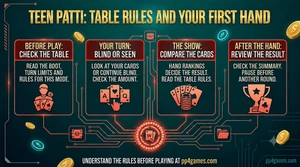
Teen Patti Basics: Boot, Blind and Seen
Read the table terms and recognise the decisions that appear during a hand.